
How to Prevent Repetitive Strain Injury: A PT’s Guide
You probably know the pattern already. Your wrist feels a little irritated after a long stretch at the keyboard. Your neck tightens by late afternoon. Your shoulder blade starts talking to you halfway through emails, spreadsheets, charting, gaming, driving, lifting, or assembly work. At first it seems minor. Then it stops going away.
That's the frustrating part about repetitive strain problems. They rarely start with one dramatic injury. They build from small amounts of stress that seem manageable in the moment, until your body decides it's had enough. If you've tried to push through, stretch once or twice, or buy one new office gadget and hope for the best, you've already learned that prevention usually takes more than a single fix.
As a physical therapist, I tell people this all the time. How to prevent repetitive strain injury isn't about finding one perfect chair, brace, or stretch. It's about layering the right habits so your tissues get less strain, more variety, and enough recovery to keep up with your day.
That Small Ache is a Warning Sign
A lot of people dismiss the first warning signs because they're subtle. The ache doesn't stop you from working. The stiffness fades after dinner. The tingling only shows up at the end of a long shift. So you keep going.
Then the pattern changes. The discomfort shows up earlier. You start shaking out your hand more often. You rub your neck during meetings. You notice you're avoiding certain movements because they're annoying or sharp. That's often the point where people realize this isn't just “sleeping funny” or a random bad day.
Repetitive strain isn't rare. The CDC's National Center for Health Statistics reported in 2023 that 9% of U.S. adults said they had experienced a repetitive strain injury in the prior three months, which gives you a sense of how common these symptoms are in everyday life, not just in extreme work environments (CDC NCHS data).
Pushing through pain often feels productive in the short term. It usually costs you more later.
I see the same mistake in exercise habits, too. People assume more effort always means better results, even when the body is sending warning signals. If that sounds familiar, this practical piece from Zing Coach on overtraining is useful because the same recovery principle applies here. Repeated stress without enough variation and recovery tends to catch up with you.
The good news is that prevention works best before symptoms become constant. Small changes made early are easier than trying to unwind months of irritation later.
Build Your Ergonomic Blueprint
The first layer is your setup. Not because ergonomics solves everything, but because a poor setup makes every hour harder on your body than it needs to be.
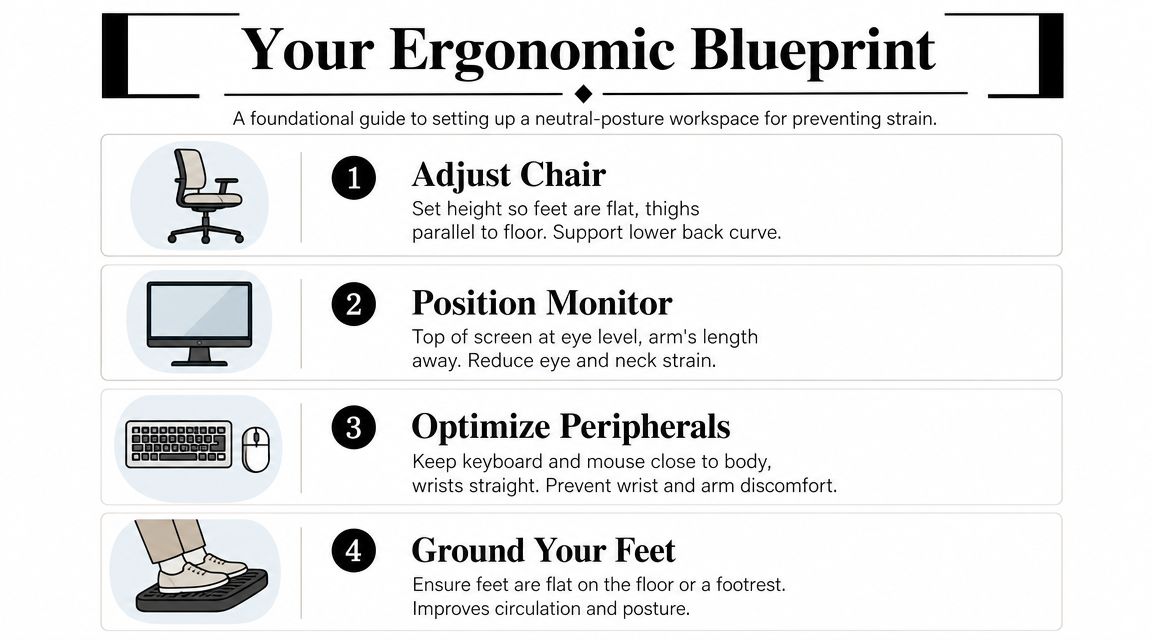
Proper ergonomics means adjusting your chair so your feet are flat, your forearms are parallel to the floor, your wrists stay neutral, and your monitor sits at eye level. That setup is meant to reduce the cumulative tendon and nerve loading that drives strain over time (occupational health guidance).
Start with the chair
Your chair sets the base for everything above it. If it's too high, you'll point your toes or hang your feet and lose support. If it's too low, your hips and knees stay cramped and your trunk tends to collapse.
Use this checklist:
- Feet supported: Put both feet flat on the floor. If the chair needs to be higher for desk access, use a footrest.
- Seat depth: Sit back far enough that your lower back contacts the chair. Don't perch on the edge.
- Arm position: Let your shoulders relax, then bring the armrests up only if they support your forearms without shrugging your shoulders.
A common mistake is trying to “sit up straight” by stiffening the whole body. That usually creates more tension, not less. The goal is support, not rigidity.
Set the screen and peripherals
Your monitor should allow you to look forward, not down for hours. A laptop on a desk by itself is one of the most common neck-strain setups I see because it forces a tradeoff. You either look down to see the screen or lift your arms awkwardly to reach the keyboard.
This quick comparison helps:
| Setup choice | Likely result |
|---|---|
| Laptop used flat on desk | More neck flexion and cramped arm position |
| Laptop on stand with external keyboard and mouse | Easier neutral neck and wrist position |
| Mouse placed far from body | Shoulder reaches outward and stays loaded |
| Keyboard and mouse close to body | Less shoulder and wrist strain |
Practical rule: If you have to reach, shrug, bend, or twist to use your tools, your body pays for it by the end of the day.
If you're considering a sit-to-stand option, a thoughtful transition matters more than buying the first model you see. This guide to standing desk converters can help you compare setups that fit your workspace and keyboard height needs.
Watch the hidden problem areas
The biggest ergonomic misses are usually small:
- Phone cradled at the shoulder: This loads the neck for no good reason. Use a headset or speaker option.
- Mouse too small or too slick: That can increase grip tension.
- Keyboard too high: If your elbows float up, your shoulders will tighten.
- Chair too far from desk: You'll reach forward all day and overload the upper back.
An ergonomic blueprint doesn't need to be fancy. It needs to remove needless strain from the tasks you repeat most.
Embrace Movement and Microbreaks
A good setup helps. Staying frozen in that setup all day doesn't.

One of the biggest myths around repetitive strain is that there's a single perfect posture you should hold from morning to evening. There isn't. The best posture is usually your next posture. Tissues tolerate load better when that load changes, even a little.
That's why frequent microbreaks matter so much. UK NHS-linked guidance recommends smaller, more frequent breaks over one long break for repetitive tasks, which fits what we see in practice. Brief interruptions in loading help more than waiting until you're already stiff and irritated (clinical summary).
What a microbreak actually looks like
A microbreak doesn't need to mean leaving the office, changing clothes, or starting a workout. It can be simple and short:
- Shoulder reset: Roll the shoulders up, back, and down a few times.
- Wrist unload: Open and close your hands, then gently circle the wrists.
- Neck break: Turn your head side to side and let your gaze shift off-screen.
- Leg wake-up: Pump your ankles or stand up briefly before sitting again.
If you need structure, set a timer or use the natural rhythm of your day. Stand after a meeting. Move after an email block. Walk while listening to a voicemail. During screen-heavy work, many people also benefit from the 20-20-20 rule for eye strain: every 20 minutes, look at something 20 feet away for 20 seconds.
Why stillness backfires
When you stay in one position too long, even a decent position becomes a stressor. Muscles hold low-level contractions. Tendons stay under repeated demand. Joints spend too much time in the same angles.
That's why movement often works better than trying harder to maintain form.
If you want a few easy options to insert into your day, MedAmerica Rehab has a useful article on top exercises if you sit at a computer all day.
A quick visual routine can make this easier to follow:
If your body only changes position at lunch, that's not enough variety for a repetitive job.
Design Your Workday to Reduce Repetition
The next layer has nothing to do with furniture. It has to do with workflow.
Major workplace safety guidance, including from the Texas Department of Insurance, recommends not only ergonomic workstations but also regular breaks and task rotation so the same muscles don't get overused all day (Texas Department of Insurance guidance).
That matters because many people keep repeating the same movement pattern even after they improve their desk setup. Better posture can reduce strain. It can't fully protect you from doing one thing for too long.
Audit the tasks that load you most
Start by listing the parts of your day that create the most repetition or sustained positioning. For many office workers, that means typing, mouse use, phone calls, and prolonged sitting. For manual work, it may be gripping tools, lifting, sorting, scanning, pushing, or overhead reaching.
Look for these patterns:
- High repetition: Same hand or arm movement over and over
- Static holding: Sitting, standing, gripping, or reaching without change
- Peak strain tasks: Activities that combine force, speed, and repetition
- Low-strain alternatives: Tasks you can insert between demanding blocks
Build variation on purpose
Here's what that can look like in real life.
For an office-based worker:
- Typing block: Focused documentation or email work
- Standing call: Get up for phone meetings or audio-only tasks
- Paperwork or reading: Change hand position and visual demands
- Brief walk: Reset before returning to keyboard work
For a hands-on worker:
- Gripping task: Use one station or tool set
- Material movement: Shift to pushing or carrying
- Setup or inspection: Lower-speed work with different arm angles
- Recovery interval: Brief pause to change position and loosen the hands and shoulders
The point isn't to eliminate work. It's to distribute load.
What works and what doesn't
Here, trade-offs are significant. A packed schedule may make hourly movement feel inconvenient. But ignoring load variation usually leads to more interruptions later because pain starts making decisions for you.
What tends to work:
- Alternating tasks before symptoms build
- Using different body positions for similar work
- Planning recovery into the day instead of hoping it happens
What usually doesn't:
- Saving all movement for the end of the day
- Doing one stretch after pain starts and calling it prevention
- Keeping the same output pace with no variation when symptoms are already building
When people learn how to prevent repetitive strain injury effectively, this is often the missing piece. They stop thinking only about posture and start managing exposure.
Essential Stretches to Counteract Daily Strain
Stretching helps, but only when you use it for the right reason. It shouldn't be your only strategy, and it shouldn't become a way to excuse a bad setup or nonstop repetition. Used well, it can reduce stiffness, restore motion, and give overloaded tissues a break from the positions you hold most.
Wrist and forearm release
If you type, click, grip, or use tools a lot, your forearm muscles often stay busier than you realize.
Try a prayer stretch:
- Place your palms together in front of your chest.
- Keep the heels of the hands together.
- Lower your hands slowly until you feel a mild stretch through the wrists and forearms.
- Keep the shoulders relaxed.
You should feel tension, not sharp pain or tingling.
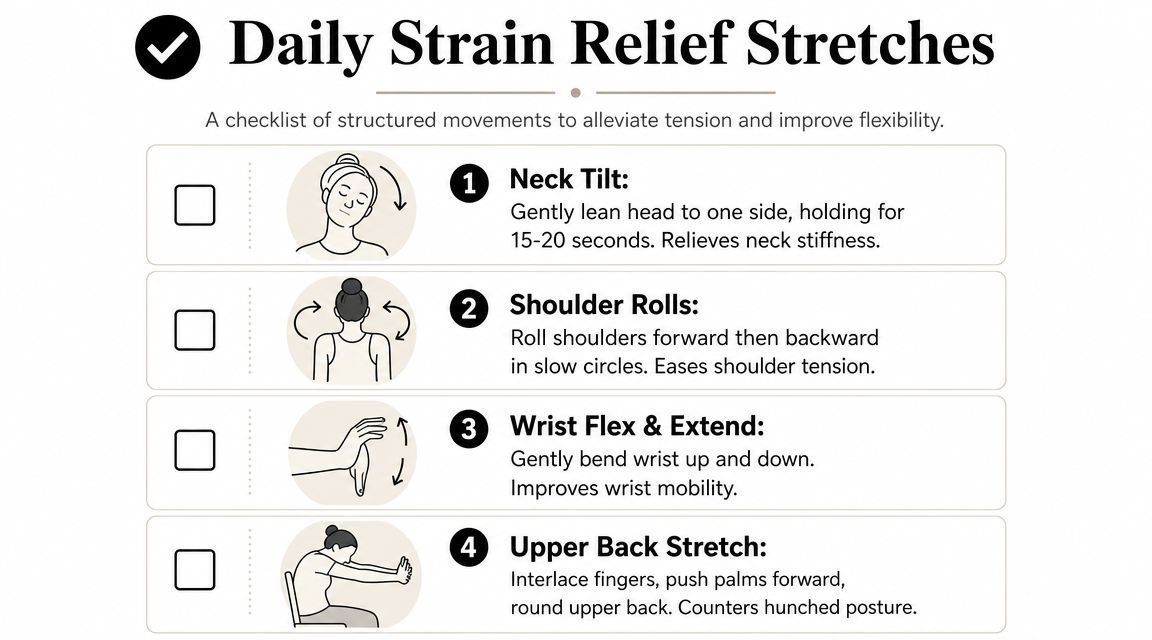
For the opposite motion, extend one arm forward with the elbow straight and gently pull the fingers back with the other hand. Then reverse it by pointing the fingers down and applying a light assist. Be gentle. Nerves don't like aggressive stretching.
Chest and shoulder opening
Desk posture often narrows the front of the chest and leaves the upper back doing too much holding.
A doorway stretch works well:
- Place your forearms on each side of a doorway
- Step one foot forward
- Let your chest move through until you feel a broad stretch across the front of the shoulders and chest
If a full doorway stretch feels too intense, do one side at a time with the elbow lower. The goal is to open the front of the body without cranking into the low back.
Stretch the area that's overworking, but also open the area that's been compressed all day.
Neck and upper back reset
For screen work, I like two simple movements.
First, do a chin tuck:
- Sit tall without forcing it
- Gently draw your head backward as if making a double chin
- Keep your eyes level
- Hold briefly, then relax
This isn't a downward nod. It's a backward glide that often helps counter forward-head positioning.
Second, try an upper back stretch:
- Interlace your fingers in front of you
- Reach your palms away
- Let the upper back round slightly
- Keep breathing normally
For a few more guided options, MedAmerica also has a practical post on four simple stretches to help increase your blood flow.
Keep the routine realistic
A good stretch routine should be short enough that you'll do it. Pick three or four movements and repeat them during one or two dedicated breaks. If a stretch increases numbness, sharp pain, or lingering irritation, stop and get it checked.
Build a Resilient Body with Healthy Lifestyle Habits
Prevention doesn't end when you log off, clock out, or leave the job site. Your body's ability to tolerate repetitive work depends on what happens outside those hours too.

Sports-focused prevention advice emphasizes warm-ups, rest days, and varying routines to avoid overuse, and that same load-management principle applies to workplace strain as well (activity-specific guidance). In plain terms, a body that never gets recovery, hydration, sleep, or strengthening has less margin for repetitive tasks.
Recovery starts with basics
Sleep is when your system gets its best chance to repair and settle down. If you consistently sleep poorly, aches that might have stayed minor often feel bigger and last longer.
Hydration matters too. No, it won't erase a bad workstation, but tissues generally tolerate movement better when your overall recovery habits are solid.
Here's the practical version:
- Sleep consistently: Aim for a routine your body can count on.
- Hydrate through the day: Don't wait until you feel wiped out.
- Warm up before demanding activity: Even a few minutes of motion helps.
- Take true rest days from high-volume hobbies: Yard work, gaming, pickleball, gym sessions, and home projects all count as load.
Strength is protective
Strong muscles don't make you immune to repetitive strain, but they can help you distribute load more efficiently. I especially like targeted work for the upper back, rotator cuff, trunk, hips, and forearms because these areas support posture, shoulder mechanics, and grip-heavy tasks.
A simple resilience plan might include:
- Scapular strengthening: Rows or band pull-aparts
- Rotator cuff work: Light external rotation exercises
- Core support: Controlled anti-rotation or basic trunk stability work
- Forearm conditioning: Gentle endurance-based wrist work, not just squeezing a gripper all day
Your workstation shapes the load. Your daily habits shape how well your body handles it.
Stress matters more than people expect, too. When stress stays high, many people clench their jaw, raise their shoulders, shorten their breathing, and carry unnecessary tension into repetitive tasks. If that's part of your pattern, it can help to explore stress relief methods that make it easier to downshift physically, not just mentally.
When to Get a Professional Assessment
Some symptoms need more than self-management. If pain is constant, wakes you at night, includes numbness or tingling, or you notice weakness, dropping objects, or clumsiness, don't keep guessing.
Another sign is time. If you've made smart changes and your symptoms still aren't improving after about a week of self-care, it's worth getting assessed. Continued irritation can turn a manageable issue into a stubborn one.
A physical therapy evaluation looks at more than the sore spot. We check the movement pattern that's driving it, the positions that trigger symptoms, the strength and mobility gaps around the area, and the work or home tasks that keep reloading it. If hand and wrist symptoms are prominent, this overview of hand physical therapy gives a clear picture of the kind of issues that often need more focused care.
The goal isn't to hand you a generic sheet of stretches and send you out the door. It's to identify what's provoking the problem and build a plan that fits your routine, your job, and your recovery needs. That's usually the fastest way to stop the cycle from repeating.
If repetitive aches are starting to interfere with work, sleep, exercise, or daily tasks, MedAmerica Rehab Center can help you get a clear assessment and a personalized plan to reduce strain, improve movement, and prevent the problem from becoming chronic.
MedAmerica Rehab · Deerfield Beach
Talk to a clinician about your pain
Physical therapy, chiropractic, acupuncture and shockwave therapy under one roof, since 1995. Same-day appointments are available.
Mon–Thu 8:00 AM – 6:30 PM · Fri 8:00 AM – 3:00 PM