
How to Improve Posture at Desk
By about 3 PM, a lot of desk workers feel the same pattern. Your neck gets tight, your low back starts talking back, and you catch yourself drifting closer to the screen even though you know better. The usual response is to try to “sit up straight” for a few minutes, then slide right back into the same position.
That doesn't happen because you're lazy or undisciplined. It happens because posture isn't something you lock into once and hold all day. If you want to learn how to improve posture at desk work, the answer is a mix of setup, movement, and a body that can tolerate the demands of sitting.
The Myth of Perfect Posture and What Actually Works
A rigid, picture-perfect posture sounds good in theory. In real life, it usually fails by lunchtime.
Rehabilitation experts now emphasize resetting often and avoiding static holds for hours, replacing the idea of one ideal posture with a cycle of movement, micro-stretches, and active recovery. That shift matters, because a posture you can't sustain isn't useful.
Why “sit up straight” often backfires
When people force themselves upright, they usually overcorrect. They stiffen the low back, lift the ribs, tense the shoulders, and hold their muscles in a constant low-grade contraction. That doesn't create comfort. It creates fatigue.
A better goal is dynamic posture. That means your body spends more time in good alignment, but it also keeps changing position through the day. Your spine likes support, but it also likes variety.
Good posture isn't one pose. It's the ability to return to a better position again and again.
What actually helps
Think in terms of a system:
- A workstation that fits your body: Your chair, monitor, keyboard, and mouse shouldn't force your neck and shoulders to compensate.
- Frequent resets: Small changes done consistently beat occasional heroic effort.
- Body awareness: You can't fix a habit you don't notice. Building better body awareness makes it easier to catch yourself before your shoulders creep up or your head slides forward.
- Targeted strength and mobility: A body with stiff hips, a tight chest, and an overworked neck will struggle to sit well even at a good desk.
Many patients feel relieved when they hear this, because it removes the pressure to be perfect. You don't need to hold an ideal posture for eight hours. You need to create better conditions and interrupt bad positions before they build into pain.
That's a much more realistic way to improve desk posture, and it's the one that tends to last.
Your Ergonomic Foundation for All-Day Comfort
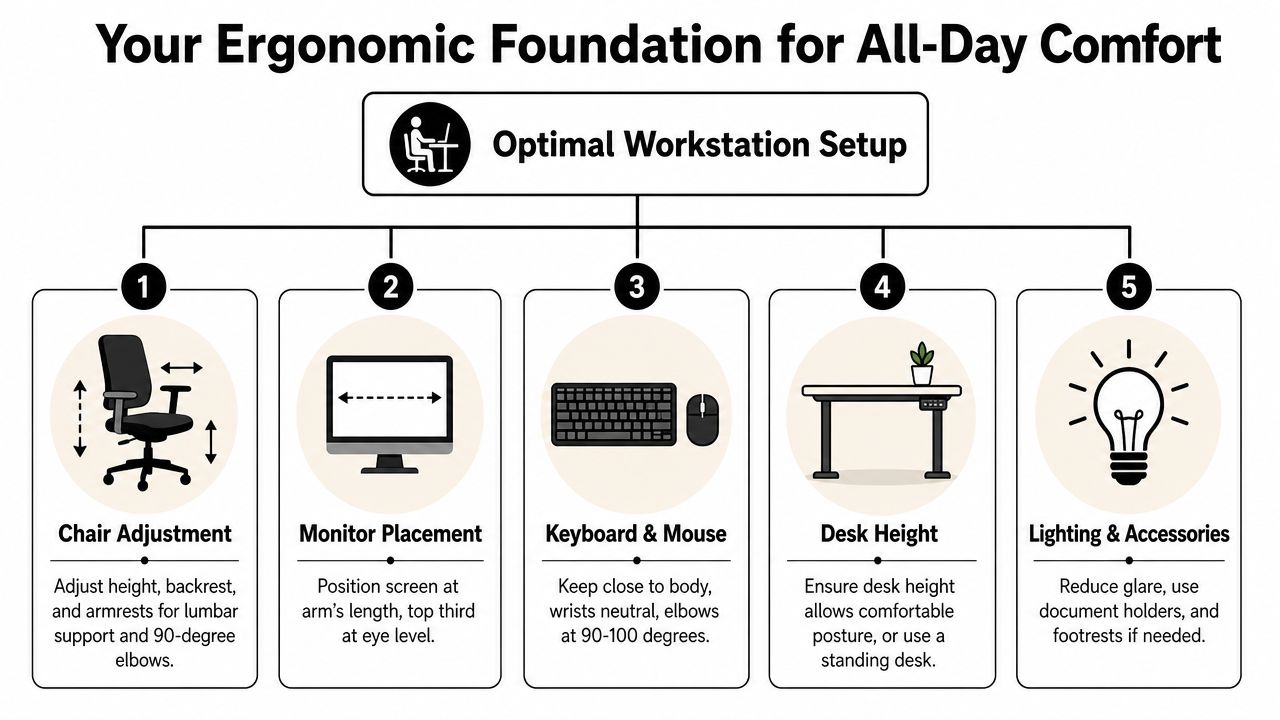
Your desk setup should make a good position easier, not harder. If your monitor is too low, your keyboard is too high, or your chair leaves your feet dangling, your body will compensate somewhere.
According to the Mayo Clinic's office ergonomics guidance, your monitor should sit 20 to 40 inches away, with the top of the screen at or slightly below eye level. Your keyboard and mouse should be at elbow height so your forearms stay parallel to the floor with a 90-degree elbow bend, and your thighs should be parallel to the ground with a 90-degree knee angle in sitting, as outlined in the Mayo Clinic ergonomic recommendations.
Start from the floor up
A common approach is to begin with the screen. I usually start lower.
Quick rule: Aim for a simple 90-90 setup. Knees near 90 degrees, elbows near 90 degrees, thighs supported and parallel to the floor.
Use this sequence:
- Set your chair height first. Your feet should rest flat on the floor. If they don't, use a footrest.
- Check your knees and thighs. Your knees should sit at about a 90-degree angle, with thighs parallel to the ground.
- Sit back into the chair. Don't perch at the front all day unless you're doing a brief posture reset. The backrest should support you.
- Adjust the armrests if needed. If they push your shoulders upward or force your elbows away from your sides, lower them or move them out of the way.
Fix the screen before your neck pays for it
If you use a laptop by itself all day, posture usually falls apart fast. The screen is too low for your eyes, so your head drops forward. Then your upper traps and neck extensors do extra work.
A better setup is a laptop stand or monitor riser with a separate keyboard and mouse. Your eyes should land naturally on the top portion of the screen without your chin lifting or dropping.
Here's the practical test. Sit back, relax your shoulders, and look straight ahead. If your monitor meets your gaze without you jutting your head forward, it's probably close.
Put your hands where your shoulders can relax
The keyboard and mouse matter more than people think. If they're too far away, you'll reach. If they're too high, you'll shrug. If they're too low, you'll collapse through the trunk.
A few useful checks:
- Keep the keyboard close: You shouldn't have to reach forward with straight elbows.
- Match desk height to elbow height: That helps keep forearms parallel to the floor.
- Keep wrists neutral: Not cranked up, down, or sideways.
- Place the mouse nearby: Reaching out to the side for hours loads the shoulder.
If you want a broader workplace overview, this guide on how ergonomics can boost comfort and productivity gives helpful context on how setup affects day-to-day work tolerance.
A fast workstation audit
Use this table once, then repeat it whenever pain starts creeping back.
| Area | What to check | What you want |
|---|---|---|
| Chair | Feet and knee position | Feet flat, knees near 90 degrees |
| Seat | Thigh support | Thighs parallel to the floor |
| Monitor | Distance and height | 20 to 40 inches away, top at or slightly below eye level |
| Keyboard | Arm position | Elbows at about 90 degrees, forearms parallel |
| Mouse | Reach | Close enough that shoulders stay relaxed |
Many individuals don't need an expensive office makeover. They need a setup that stops pulling them into strain every hour of the day.
Desk-Friendly Exercises to Reclaim Your Mobility
A good setup removes some stress. It doesn't undo stiffness you've already built.
When someone sits for long stretches, the same pattern shows up over and over. The chest gets tight, the upper back gets lazy, the neck starts leading the movement, and the hips become less tolerant of staying bent. That's where simple mobility and activation drills help.
Consistent posture resets every 30 to 60 minutes can help, and one ergonomic method cited by Mount-It reports an 85% reduction in forward head posture complaints within 4 weeks when applied consistently, according to its posture reset guidance.
Chin tucks for the forward head position
This is one of the most useful drills for people who drift toward the screen.
How to do it:
- Sit tall without lifting your chin.
- Gently draw your head straight back.
- Make a small “double chin.”
- Hold briefly, then relax.
Do this after a long email block or video meeting, especially if your neck feels bunched up at the base of the skull.
Seated cat-cow for a stiff mid-back
A lot of “neck pain” is really a mid-back that stopped moving well. Seated cat-cow can help you get motion back without leaving your chair.
Try it like this:
- Sit near the front of your chair with both feet grounded.
- Round your upper back gently as you exhale.
- Then roll your chest forward and let the breastbone lift slightly.
- Move slowly rather than forcing a big range.
This works well as a reset after you've been locked into one task and feel generally compressed.
If a movement feels sharp, pinchy, or sends symptoms into the arm, stop and get it checked instead of pushing through.
Doorway pec stretch for rounded shoulders
When your chest gets stiff, your shoulders often stay forward even after you try to sit better.
Use a doorway:
- Place one forearm against the frame.
- Step forward until you feel a stretch across the front of the chest.
- Keep the neck relaxed.
- Repeat on the other side.
This is a smart choice after long typing sessions or any day with heavy laptop use.
Sit-to-stand and shoulder blade reset
Not every corrective exercise has to look like rehab. Sometimes the best move is standing up on purpose.
Try this brief sequence:
- Stand from your chair without using your hands if able: This wakes up the hips and breaks the sitting cycle.
- Roll the shoulders back once or twice: Don't crank them down aggressively.
- Gently draw the shoulder blades back and down: Think “broad collarbones,” not “squeeze hard.”
- Take a few easy breaths before sitting again.
If you want a few more practical ideas, these computer-day exercise suggestions are useful for building a short routine you'll stick with.
What works better than a long workout
You don't need a perfect 30-minute session in the middle of the workday. A shorter routine done repeatedly is often more realistic.
Try pairing movements with moments you already have:
- chin tucks after meetings
- doorway stretch after lunch
- seated cat-cow when your back feels stiff
- sit-to-stand every time you finish a task block
That kind of repetition builds better posture capacity without turning your workday into a full exercise class.
Build Posture-Positive Habits and Micro-Breaks
Even the best desk setup loses value if you stay frozen in it.
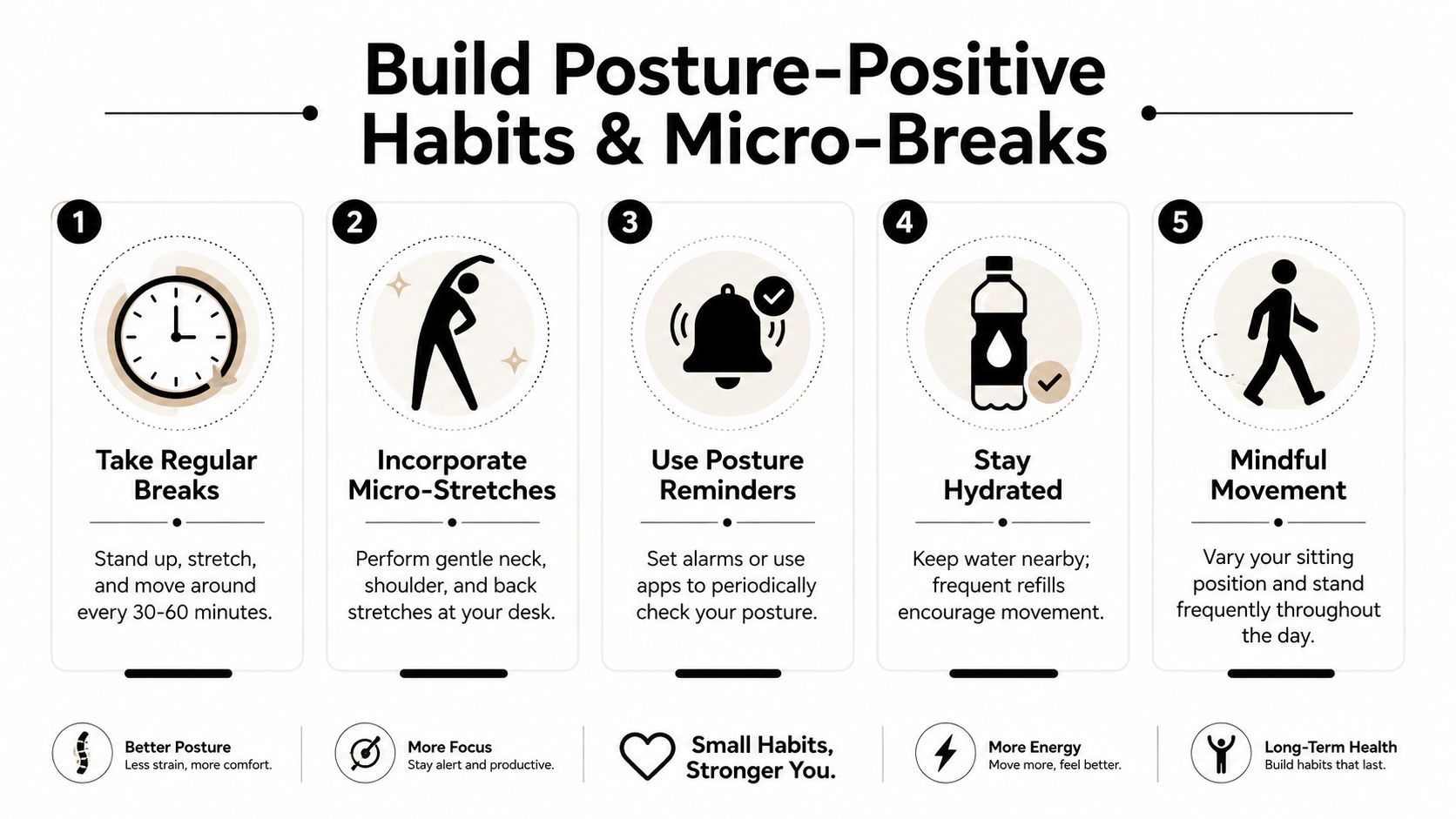
The Spine Health Foundation advises taking a 10-minute break every hour to get up and move, and research discussed in PMC also notes that alternating between sitting and standing, such as 20 minutes sitting and 8 minutes standing, can positively affect posture, as described in this movement-break and sit-stand review.
Small movement beats occasional effort
People often tell me they stretch a lot at night but still feel terrible at work. That makes sense. Your body responds better to frequent interruptions of load than to one big attempt to undo the whole day later.
A few habits make a real difference:
- Use a timer: An hourly prompt works well because it takes discipline out of the equation.
- Stand before you feel awful: Waiting until your back screams at you is too late.
- Tie movement to existing routines: Stand for phone calls, refill your water bottle, or walk after meetings.
- Alternate positions: If you have a sit-stand desk, use it. If not, build standing moments into regular tasks.
The video below gives a simple visual reminder of what good movement habits can look like during the day.
A practical micro-break menu
Not every break has to be a workout. The easier the break, the more likely you'll do it.
Try rotating these options:
- Walk to reset your spine: A lap around the office or home is enough.
- Change your task standing up: Read, take a call, or review notes on your feet.
- Do one mobility move: Neck reset, chest opener, or a few gentle back movements.
- Rest your eyes: For children using screens, the 20-20-20 rule is recommended. Every 20 minutes, look at something 20 feet away for 20 seconds.
- Use focused breaks well: If you work in timed blocks, Kohru's tips for focused breaks offer practical ideas that make break time feel useful instead of random.
Practical cue: Don't ask whether you have time to move. Ask whether you have time to stay stiff for another hour.
Make posture habits easier to keep
The best habit is the one that happens without much debate.
Keep water away from your desk so you have to get up. Put a sticky note on the monitor that says “feet, ribs, head.” Set your standing desk to change position at predictable times. If your pain has already become persistent, structured care can help too. MedAmerica Rehab Center offers physical therapy and related services that can support people who need more than self-directed desk changes.
You don't need a perfect routine. You need repeatable interruptions to stillness.
Common Posture Mistakes to Stop Making Today
Most desk pain isn't caused by one dramatic error. It comes from small habits repeated for hours.
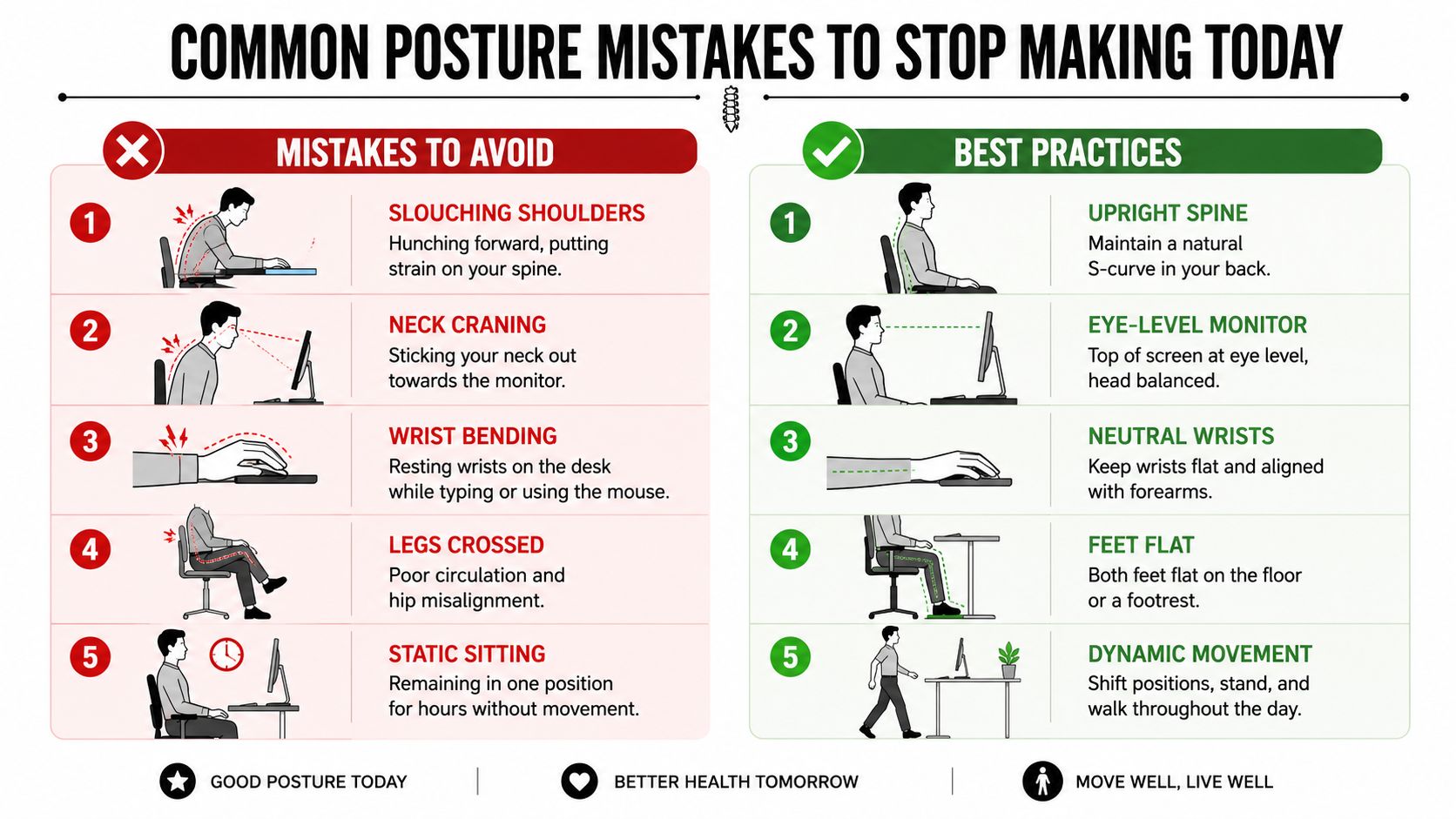
Some of those habits are more costly than they look. According to guidance from SSEP, crossing the legs can increase lumbar shear by 40%, placing keyboards too high or too low is linked to 62% of elbow and shoulder pain cases in desk workers, and using a hands-free headset can eliminate 90% of cervical torsion from phone cradling, based on these desk posture risk details.
Problem and fix
| Mistake | Why it matters | Better option |
|---|---|---|
| Crossing your legs | Can increase lumbar shear by 40% | Keep both feet supported on the floor or a footrest |
| Keyboard too high or too low | Linked to 62% of elbow and shoulder pain cases | Adjust chair or desk so elbows stay near 90 degrees |
| Cradling the phone | Twists the neck repeatedly | Use a hands-free headset, which can eliminate 90% of cervical torsion from this habit |
| Reaching for the mouse | Loads the shoulder and upper trap | Move the mouse closer to your body |
| Holding one “good” position too long | Stiffness builds even in decent alignment | Change position before discomfort ramps up |
The habits people miss most
Two mistakes fly under the radar.
First, people let the keyboard sit wherever the desk happens to place it. If your shoulders rise while typing, your setup is working against you.
Second, people think stillness equals discipline. It doesn't. At a desk, long static holds usually mean your tissues are getting less tolerant, not more.
A simple fix is to make the easy choice the healthy choice. Put the phone on speaker or headset. Bring the input devices close. Keep both feet grounded. Then move before your body asks loudly.
When to Seek Professional Help for Desk Pain
If desk discomfort is mild and recent, ergonomic changes and movement habits often help. But some symptoms mean it's time to stop guessing.
Watch for problems like pain that keeps returning despite setup changes, numbness, tingling, pain that travels into the arm or leg, headaches tied to desk work, or symptoms that worsen when a position should feel supportive. Those patterns can point to something more than simple muscle fatigue.
Signs that call for an assessment
- Radiating pain: Symptoms spreading into the arm, hand, leg, or foot
- Numbness or tingling: Especially if it's frequent or persistent
- Chronic headaches: Particularly when they show up with computer work
- Loss of function: Grip weakness, trouble turning the head, difficulty standing upright after sitting
- Pain after an old injury or surgery: Your body may need more specific guidance
For people who like objective movement information, Meloq devices ROM insights offer a useful look at how lumbar motion is considered in movement assessment.
If you're in Deerfield Beach and self-care hasn't been enough, a more personalized evaluation can help connect the dots between your symptoms, workstation habits, and movement limits. This guide on how physical therapy helps with back and neck pain gives a clear picture of what that process can involve and when it makes sense.
If desk pain is interfering with work, sleep, driving, or simple daily movement, it may be time for a personalized plan. MedAmerica Rehab Center in Deerfield Beach provides physical therapy, chiropractic care, acupuncture, and other non-surgical treatment options for back pain, neck pain, sciatica, headaches, and related posture problems.
MedAmerica Rehab · Deerfield Beach
Talk to a clinician about your pain
Physical therapy, chiropractic, acupuncture and shockwave therapy under one roof, since 1995. Same-day appointments are available.
Mon–Thu 8:00 AM – 6:30 PM · Fri 8:00 AM – 3:00 PM